Dell Latitude 7420 2-in-1: is a used business convertible worth buying?
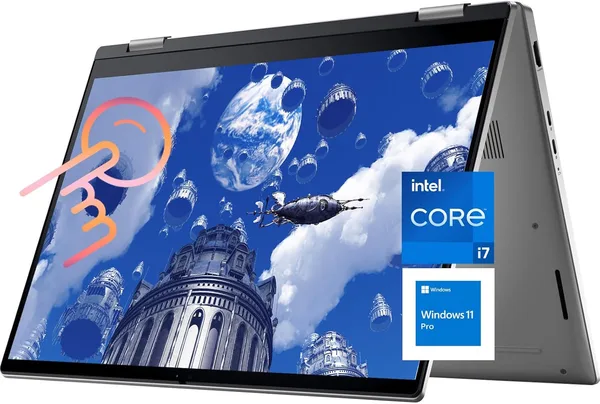
The Dell Latitude 7420 2-in-1 is a used corporate laptop with an i7-1185G7, 16GB of RAM, and a touchscreen 14-inch display, priced like a brand-new budget Celeron laptop. If you need a reliable work machine without any flash, it's worth buying. If you're dreaming of a light ultrabook with thin bezels and all-day battery, look elsewhere.
There's a certain type of laptop nobody ever buys with excitement, yet everyone who owns one somehow ends up satisfied. It's the corporate Dell — the same one your friend in IT has been running for five years without a single complaint, apart from "the battery isn't what it used to be." The Latitude 7420 2-in-1 belongs to exactly that cohort. Except this time it also folds into a tablet and has a touchscreen — a feature far from every business model had back in 2021.
Let's start with the obvious: this isn't a new laptop. On the secondary market, machines like this arrive after corporate leasing — a company used it for three years, wrote it off, and now it sells for a fraction of the original price. That's the whole magic and the whole risk, rolled into one.
What this thing actually is
Inside is an 11th-gen Intel Core i7-1185G7, 16GB of RAM, and a 512GB SSD. On paper, those numbers no longer inspire much excitement — this is a four-year-old chip, and it loses to a fresh Ryzen 5 in a laptop at the same price in benchmarks. But here's what matters more: this chip wasn't designed to win synthetic tests — it was designed to quietly and coolly handle office tasks eight hours a day, five days a week, for years. And it does exactly that.
The screen is 14 inches, FHD, touch-enabled, with the ability to fold the chassis into tablet mode or "tent" mode for watching video. Honestly, touch on a business laptop is something you end up using less than you'd think when buying it. The first two weeks you tap at everything, then you go back to the mouse. But when you need to quickly sign something or flip through a PDF in a meeting, you suddenly understand why it was built in.
Windows 11 Pro on board is no small thing for anyone buying hardware for work or a small business: the Pro edition gives you BitLocker, remote access via RDP, and group policies right away — features you'd otherwise pay extra for on a new laptop running the Home edition.
How it behaves in real life
The keyboard is the reason people keep buying Latitudes over and over. Key travel is deep, the sound is muted, and it's harder to mistype than on the thin ultrabooks of recent years that chase millimeters of thinness. If you type all day — text, code, reports — the difference is noticeable within the first half hour.
Put it side by side with a typical Chinese business clone at the same price, and the Dell wins on three fronts right away: a magnesium-alloy build that doesn't creak or flex under your palm, a fingerprint reader for quick login, and the fact that spare parts — keyboard, battery, even the motherboard — will be findable on the secondary market for years to come, since this model was produced by the thousands for corporate fleets.
One real, noticeable downside: battery life. This machine's battery isn't new anymore, and even in the best condition, 11th-gen Intel was never known for efficiency — expect six to seven hours of light work rather than the manufacturer's advertised figures. For someone with an outlet always nearby, that's a non-issue; for those working from cafés and co-working spaces, always keep a charger in the bag.
Compared to a new budget laptop at the same price, the Latitude loses on component freshness but wins on basically everything else: material quality, repairability, service software, and hinge reliability, which was clearly engineered here for thousands of open-close cycles.
Who should buy it, and who shouldn't
Buy it if you need a workhorse for office tasks, remote work, Zoom calls, and documents — and don't want to pay a retail brand premium. Buy it if you value the keyboard more than chassis thinness. And buy it if you're willing to treat used hardware as used hardware — with no illusions about the battery being in perfect shape.
Don't buy it if you need a laptop for video editing, heavy 3D rendering, or gaming — the i7-1185G7 with its built-in Iris Xe graphics simply can't keep up. Don't buy it if your top priority is weight and thinness — that's not this segment. And if you're outright scared off by the word "used," this isn't for you either, even though at around $378 it's arguably one of the best deals in the touchscreen business-laptop segment, period.
FAQ
For office tasks, a browser with twenty tabs, Excel, and video calls — yes, no problem. For heavy editing or gaming — no, and there's no point trying to convince yourself otherwise.
If you plan to actually use tablet mode — yes. If you're buying it "just in case, might come in handy," get a regular, non-touch Latitude instead and save the difference.
The Yoga 7i is newer, with a 16-inch screen and a fresher Core Ultra chip — a pick for anyone who wants current hardware and better battery life. The Latitude 7420 is a pick for anyone who values corporate build quality and the keyboard, and doesn't mind buying a cheaper used machine.
Technically something light like CS:GO on minimum settings will run. But this isn't a gaming laptop, and buying it for that purpose is a guaranteed disappointment.