Lenovo Yoga 7i 2-in-1: Transformer Laptop Review and Should You Buy
The Lenovo Yoga 7i is a 16-inch transformer you can actually fold into a tablet without hurting your wrist. The screen is spacious and pleasant, performance has headroom for office work and light editing, and the 360° hinge actually gets used—tent mode for movies, tablet mode for doodling notes. But 4.4 pounds in tablet mode is a compromise you'll feel, and there's no gaming or video rendering power here.
Picture a conference call where half the team's typing notes and the other half is sketching something on screen because the keyboard just doesn't work right. That's the exact scenario transformers like the Yoga address. Question is whether this specific machine does "two in one" or just awkwardly straddles "neither well."
Spent a week with the Lenovo Yoga 7i—worked like a regular notebook, tried the tablet mode, tested the stylus (not included but supported), did actual work. First impression: this is actually more laptop-first than transformer-first. The 360° hinge turns smooth with zero slop or creaking—petals aren't cheap plastic. That's the ThinkPad heritage trickling into the consumer line.
The 16-inch FHD+ display with touchscreen is the main reason you even glance at this machine. That extra screen real estate immediately lets you see more—two windows side by side without squinting, spreadsheet columns don't get crammed into oblivion. It's glossy, so direct sun is uncomfortable, but indoors in office or home, that's not a problem. The screen brightness and responsiveness to touch are what you'd expect at this level.
The heart: AMD Ryzen 7 7735U—and the maker drops hints in the name that it "beats" Intel i7-1255U. Real-world difference in office tasks: subtle. Browsing with two dozen tabs, Zoom call, Excel with complicated formulas, light Photoshop—all processed without stuttering or the fan ramping to nightmare levels. This isn't gaming or rendering horsepower; for the "work machine" scenario, headroom is sufficient.
16GB RAM and one full terabyte SSD mean you're not scrubbing the drive weekly and don't hit memory walls quickly. Windows 11 Pro on board is a plus if you do corporate domain or BitLocker security; a minor cost bump if you only need Home.
The Tablet Bit
Here's where reality meets wishful thinking. Yes, it folds and becomes tablet-shaped. Stylus mode, signing PDFs, sketching—that works, responsive, minimal lag. But 4.4 pounds is nearly two kilograms. Hold that "tablet" in one hand for more than a few minutes; your wrist begs mercy. This isn't an iPad and wasn't engineered to be. The real tablet scenario: prop it on the table in tent mode to watch a movie or show your colleague something across the desk—not carrying it around like a pad. If you're expecting iPad-level portability, you're barking up the wrong tree.
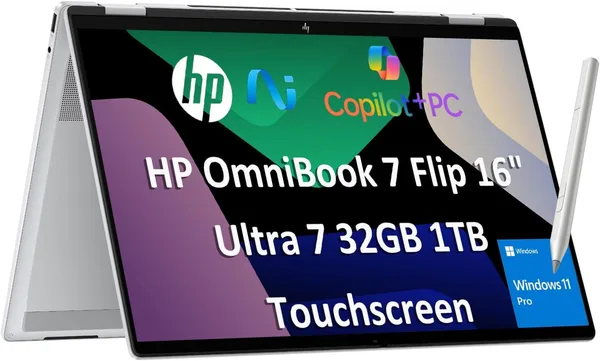
Compare to the clear genre rival—HP OmniBook 7 Flip, also 16, also transformer. HP's beefier (Intel Ultra 7 with 32GB) and pricier; Lenovo's lighter on the wallet and Ryzen 7 is nothing to sniff at. Pick HP if you want compute headroom for years; pick Yoga if today's work matters more than tomorrow's overkill.
The keyboard has nice travel, not squishy like those ultra-thin models that trade comfort for thinness; trackpad is roomy and precise without glitches. Port layout isn't fully detailed in the specs, so if you have odd peripherals, verify before purchase.
Price: $999.99 stateside, without shipping. Import to your country and add the tax hit; don't be shocked at checkout if you're used to U.S. sticker prices.
Get it if: you honestly use stylus or tablet mode—designers sketching quick ideas, consultants signing docs with a pen on-screen, office workers showing clients presentations by hand. Plus those who want a big 16-inch screen but still preserve form-factor flexibility.
Skip it if: the transform mechanism is "maybe useful someday"—then you're just paying for a feature you'll never activate; or if all-day off-outlet work is essential—the big bright screen and Ryzen eat through charge faster than U-series efficiency class.
FAQ
Only if you genuinely use the stylus or tablet mode regularly. For pure office work, the transformer charges extra for a feature most won't exploit; standard laptop of the class costs less.
HP's more powerful (Intel Ultra 7, 32GB) and pricier. Get that if budget's unlimited and you want performance safety for years. Lenovo if you want transformer now and don't need overkill compute.
Light editing yes, heavy 4K or complex projects—no discrete GPU means you'll hit limits. Integrated Radeon handles casual content creation, not studio work.
Yes, reasonable for a 16-inch machine. Not ultralight, but within normal range. If every 100 grams matters, look at 13-14-inch options instead.
Relevant products to check before buying: