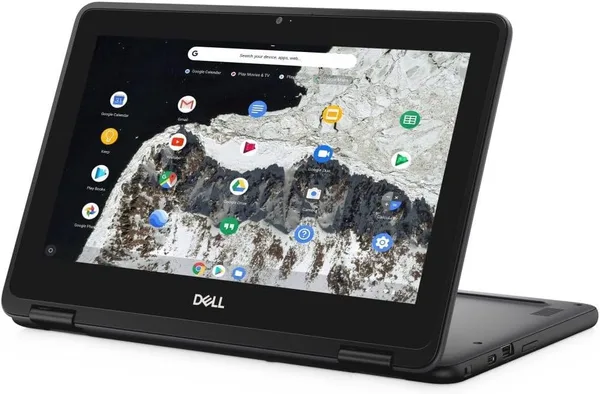
Dell Chromebook 11 3100 2-in-1 review: is it worth buying in 2026?
The Dell Chromebook 11 3100 2-in-1 isn't a laptop for real work, it's a second machine for reading, Zoom calls, and a kid doing homework. For what it costs (around $85 before shipping), it does exactly what it promises and not one gram more. Expect performance and you'll be disappointed; expect a handy everyday tablet-netbook and it'll earn its spot in the bag without complaint.
It's a familiar scene: the kid's old laptop finally died, or your mom wants "something simple, just for Viber and the news, and nothing heavy." Your first instinct is to say "just buy a MacBook," but the budget says otherwise. That's exactly the gap the Dell Chromebook 11 3100 2-in-1 fills — a small touchscreen Chromebook that Dell used to ship to US schools by the truckload, and which is now living a second life as a "renewed" listing on marketplaces.
What this thing actually is
An 11.6-inch touchscreen that folds a full 360 degrees, so you can prop it up "tent-style" for video or fold it flat into a slightly clunky tablet. The Celeron N4000 and 4GB of RAM are numbers that make any geek wince, but here's the thing that actually matters: Chrome OS isn't Windows. It doesn't hoard half a million background processes, it doesn't spend hours updating, and it doesn't choke because you opened your seventeenth tab. The whole system is built around exactly this kind of minimal hardware, and that's the entire trick.
I'd compare it less to a laptop in the classic sense and more to a very smart internet terminal. Mail, Google Docs, YouTube, video calls, reading the news — all of that flies without complaint. Try opening an ad-heavy website while keeping Google Meet running at the same time, though, and you'll feel those 4GB of RAM reminding you they exist, through stutters and reloading tabs.
Where it genuinely earns its keep
The best-case scenario is a schoolkid or student who needs something for Google Classroom, essays, and presentations, and who you don't mind tossing in a backpack because a scratch here or there is no big deal. Second scenario: an older relative who just wants to watch videos from the grandkids and log into a banking app through the browser. Third: a genuine backup device for the summer house or travel, for when taking the main laptop feels too risky.
The touchscreen here isn't a marketing gimmick — it genuinely adds convenience when you're scrolling news or sketching something in a simple editor. And battery life is traditionally a Chromebook strength: this one gets through a full working day without hunting for an outlet, which matters more to a kid at school or a grandparent in the kitchen than any number of gigahertz.
Where it runs out of steam
Ten Chrome tabs open at once with YouTube running in the background is already a stress test the N4000 and its 4GB lose. Forget Photoshop, video editing, or anything resembling a demanding game — that's simply not this device's league. And here's a detail people often forget: if you need classic Windows software — accounting programs, specific corporate tools, certain desktop banking clients — Chrome OS simply won't run them. It does support Android apps, but on this screen and this processor they run so-so, often with visible lag.
Compared to its direct rival, the Acer R13 Convertible Chromebook — also touchscreen, also a convertible, but with a bigger 13.3-inch screen — the Dell loses on screen real estate but wins on portability: 11.6 inches slides into a woman's bag or a kid's backpack far more easily than 13. Compared to the Acer Chromebook 311 in the same 11.6-inch class, you'll usually find the same 4GB + 32GB combo, meaning they're basically siblings, and picking between them comes down to the price and condition of the specific listing rather than any real difference in capability.
One more nuance worth knowing upfront: this is a "renewed" unit, meaning refurbished, not fresh out of a box. For a Chromebook that's completely normal and shouldn't be a red flag — the hardware is simple enough that there's not much to wear out, and Chrome OS keeps itself updated automatically. But go into the purchase understanding that a scuff on the lid or a slightly worn trackpad is the expected norm, not a reason to panic.
What it actually costs
The device itself sells for around $85 before shipping — a sum that barely covers a decent power bank in most places, let alone a computer. For the full landed price with international shipping and your own country's import duties factored in, check the total cost calculated for your country on dede.sh — it varies a lot depending on where you live, and it's still a real alternative to a cheap new netbook from a local store, often with better build quality and a better screen.
The honest verdict
Buy it if you need a second or third device in the household for browsing, schoolwork, or calls, and the budget is genuinely tight. Skip it if it needs to be your only work tool, or if your plans involve anything heavier than Google Docs and YouTube. There's exactly one compromise here, but it's a clear one: you pay the minimum and get the minimum — except that minimum is put together carefully, without the random glitches typical of budget Windows netbooks in the same price bracket.
FAQ
For one or two tasks at a time — yes, absolutely. Mail, a document, scrolling the news — no problem. But try opening a dozen tabs and starting a video call at the same time, and you'll watch the system start reloading pages from disk. That's not a bug, that's just the physics of 4GB.
If you need a bigger screen for video or document work, the Acer with its 13.3 inches wins. If portability and everyday carry matter more, the Dell's 11.6 inches is easier to live with. Functionally they're twins — the difference is screen size and the price of the specific listing.
No, and don't even try — Chrome OS is a separate operating system that doesn't run .exe files. If you need a specific piece of Windows software (accounting tools, certain banking clients), this device isn't for you at all.
Not for a Chromebook. The hardware is simple and reliable enough that refurbished units typically run fine for years. Just budget for some minor cosmetic wear from prior use.
If you're still torn between form factors, take a look at its direct rivals in the same class.